 Download appDownload app
At Pocket FM, content doesn't just get created — it goes through a carefully orchestrated journey before it ever reaches a listener. Scripts get written and reviewed. Audio gets recorded, mastered, and signed off. Videos get edited and approved. Each step involves multiple people, roles, and handoffs.
As our content ecosystem scaled — across formats, regions, and teams — this journey started breaking down. Workflows were fragmented, progress was invisible, and every team had their own way of doing things.
So we built FLOW: a unified content workflow platform that models, automates, and tracks the entire content creation lifecycle — from first draft to final publish.
This is the story of why we built it, how it works under the hood, and where it's headed next.
Before FLOW, coordinating a single promo meant juggling emails, Slack messages, and shared spreadsheets — across writers, voice artists, sound engineers, and video editors. A producer would send a script, wait for confirmation that it was received, follow up if there was no response, track the recording manually, ping the sound engineer for a status update, and hope nothing fell through the cracks. And this was just for one promo.
Multiply that across dozens of pieces of content, multiple teams, and different regions — and the chaos becomes clear.
At Pocket FM, content creation faced several challenges:
Fragmented workflows across regions and teams Different teams followed their own processes, rules, and tools, making collaboration inconsistent and difficult to manage centrally.
Limited visibility and lack of actionable insights There was no single source of truth to track content progress, performance, or bottlenecks—making it hard for producers and leads to make data-driven decisions.
Multiple content types with complex lifecycles Stories, promos, podcasts, and audio shows each followed unique, multi-step workflows involving several stakeholders and handoffs.
Inconsistent execution and quality control Varying workflows made it difficult to enforce standard review processes and maintain consistent quality across content types.
Poor scalability and adaptability Modifying or extending workflows to support new formats, tools, or automation required significant effort and manual coordination.
To understand how FLOW solves this, we first need to understand the process it's replacing.
Before diving into how FLOW streamlines the entire process, let’s first look at how promo creation workflow usually works in a traditional setup.
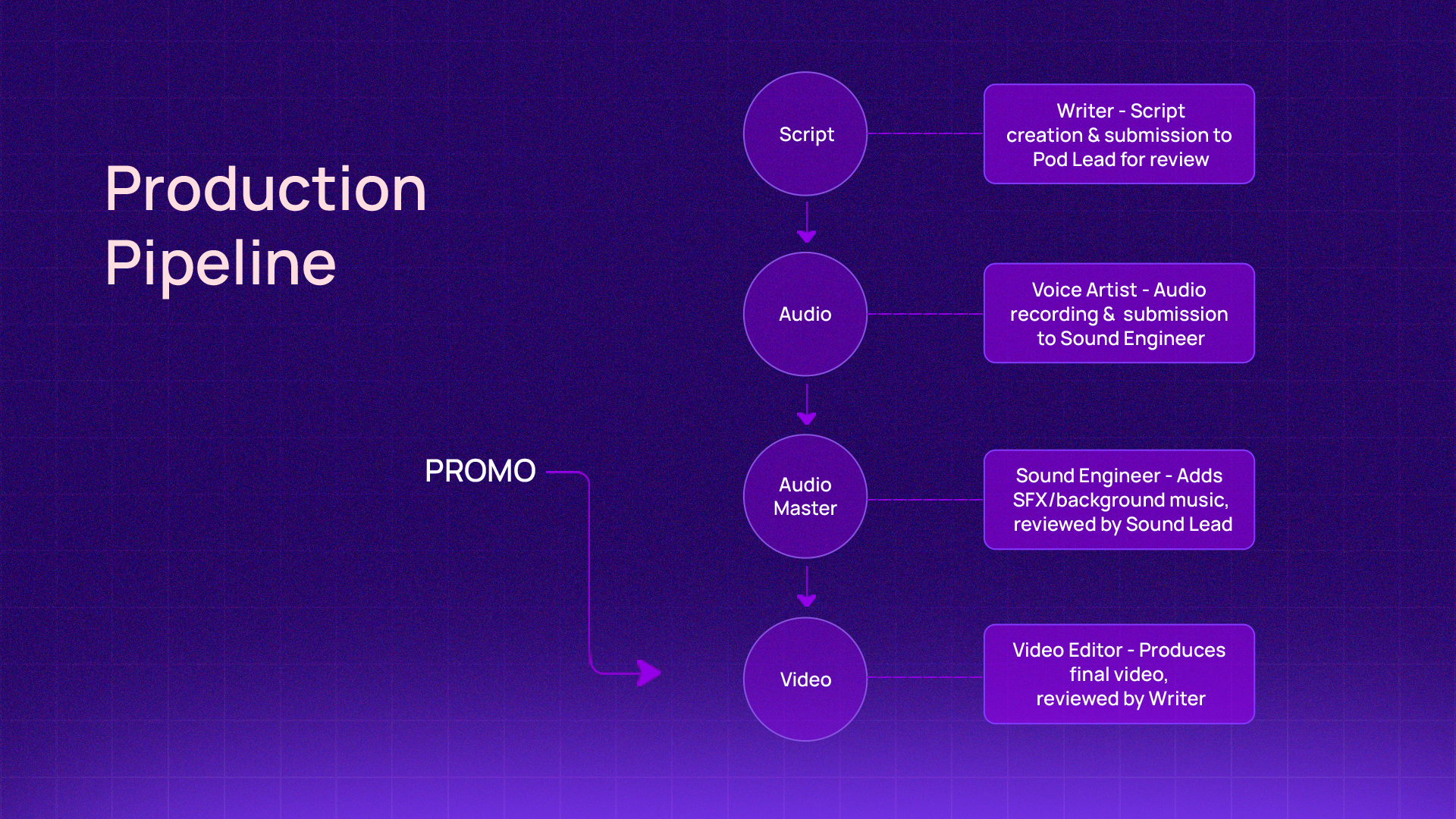
The diagram below illustrates the fundamental process of an end-to-end Promo Creation Workflow — starting from the initial script writing to the final video output. The journey consists of four key stages, each involving dedicated artists who perform their tasks, review the work, and then pass it along to the next stage in the process.
1️⃣ Script
Writers prepare the initial concept and script for the promo. The Pod Lead reviews it, and once approved, the promo moves to the Audio stage.
2️⃣ Audio
The Voice Artist records the audio based on the approved script. The Sound Engineer reviews and finalizes the recording. After approval, it progresses to the Audio Master stage.
3️⃣ Audio Master
The Sound Engineer enhances the audio by adding sound effects (SFX) and background music to create the final master version. Once approved by the Sound Lead, it advances to the Video stage.
4️⃣ Video
The Video Editor compiles and edits the visuals along with the mastered audio to produce the final promo video. After the Video Lead’s approval, the promo is officially completed and ready for release.
The problems were clear. But before building a solution, we had to answer one fundamental question — why not use what already exists?.
Think of FLOW as JIRA for media creation — but that analogy also explains exactly why JIRA itself couldn't do the job.
JIRA is built around tasks and projects. FLOW is built around the lifecycle of content. The difference matters more than it sounds — a script isn't a ticket you close, it's a living asset that moves through defined states, triggers automated actions, and requires specific approvals from specific roles at each stage. That kind of structured, state-driven workflow isn't something you can configure into a generic project management tool.
Beyond states and transitions, FLOW needed to natively understand content assets — scripts, audio files, video edits — each carrying version history and context as they progress. It needs role-based authorization that changes depending on where the content is in its lifecycle, not just who the user is. And it needed the flexibility to plug in AI automation and real-time notifications as first-class features.
JIRA could have tracked the work. FLOW is the work.
Now that we've seen how this process works manually — the handoffs, the dependencies, the approvals — here's how FLOW models and automates every step of it..
FLOW is designed to handle any type of content workflow, giving every team the freedom to define processes that fit their content and rules. This ensures that all content types—from stories and promos to audio shows—move seamlessly from creation to publishing.
FLOW is built on the same principles as the traditional content creation process — the analogy that inspired its architecture. As we saw in the Fundamental Process of Promo Workflow, the journey moves through four distinct stages, each involving specific contributors, review checkpoints, and handoffs.
FLOW models this process systematically, breaking it down into four key components:
1️⃣ States
Represent the different stages of the content lifecycle — for example, SCRIPT_REVIEW, AUDIO_PROGRESS. Each state corresponds to a phase in the process, similar to script, audio, audio master, and video stages in traditional promo creation.
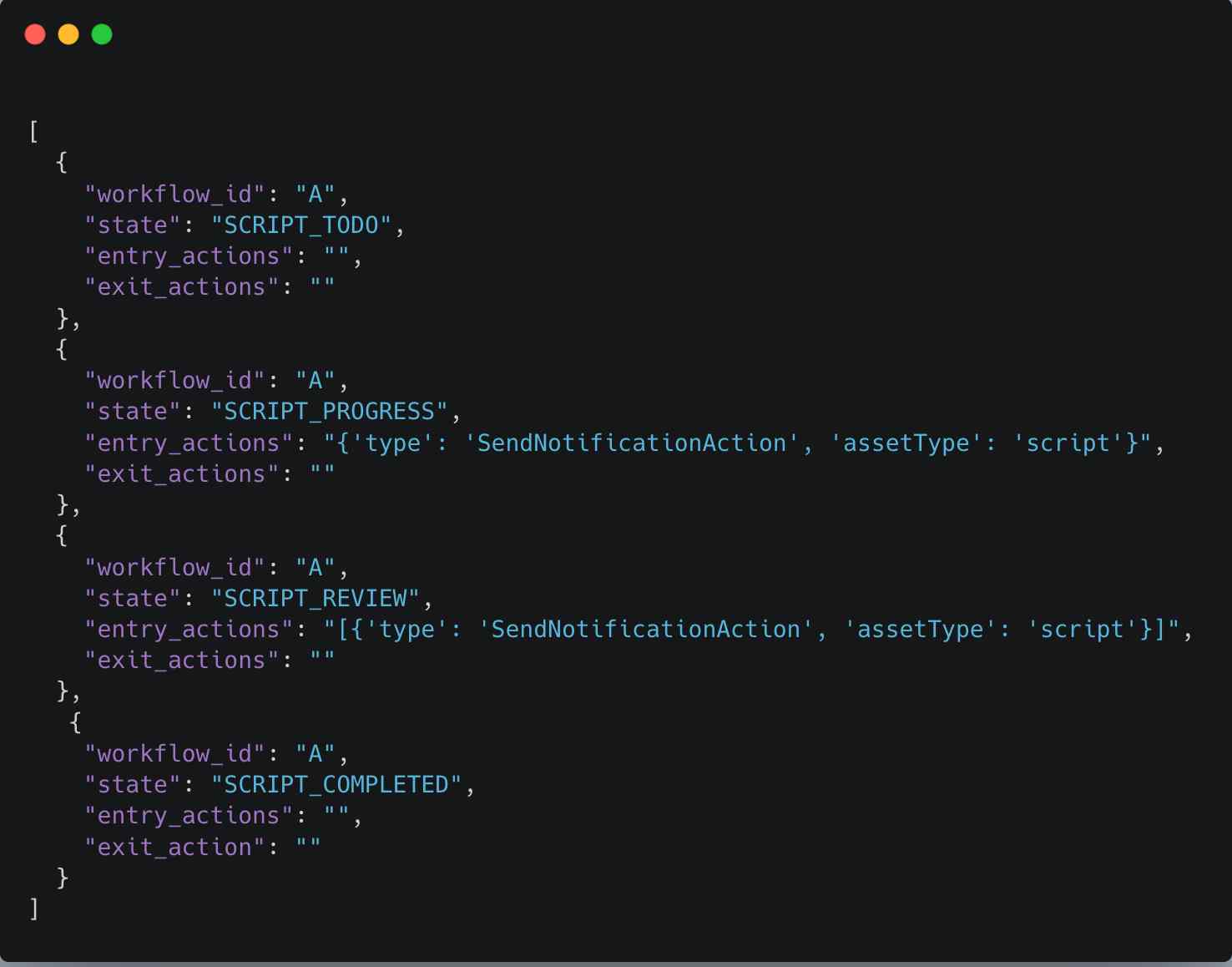
The JSON snippet above defines the state configuration for workflow “A” and illustrates four script-related states. Each state can optionally specify entry_actions and exit_actions, enabling flexible control over what happens when a workflow enters or exits a particular state.
This modular design simplifies the management of workflow behaviours—making it easier to add, remove, or modify actions without disrupting the overall workflow structure.
These actions allow defining automation hooks that are automatically triggered when a workflow enters a specific state — for example, triggering AI-based audio generation as soon as the script reaches the “Ready for Voice” stage.
2️⃣ Transitions
Define the rules and conditions that determine how content moves from one state to another. Just like moving from Script to Audio after approval, transitions in FLOW are driven by validations, approvals, or automated triggers.
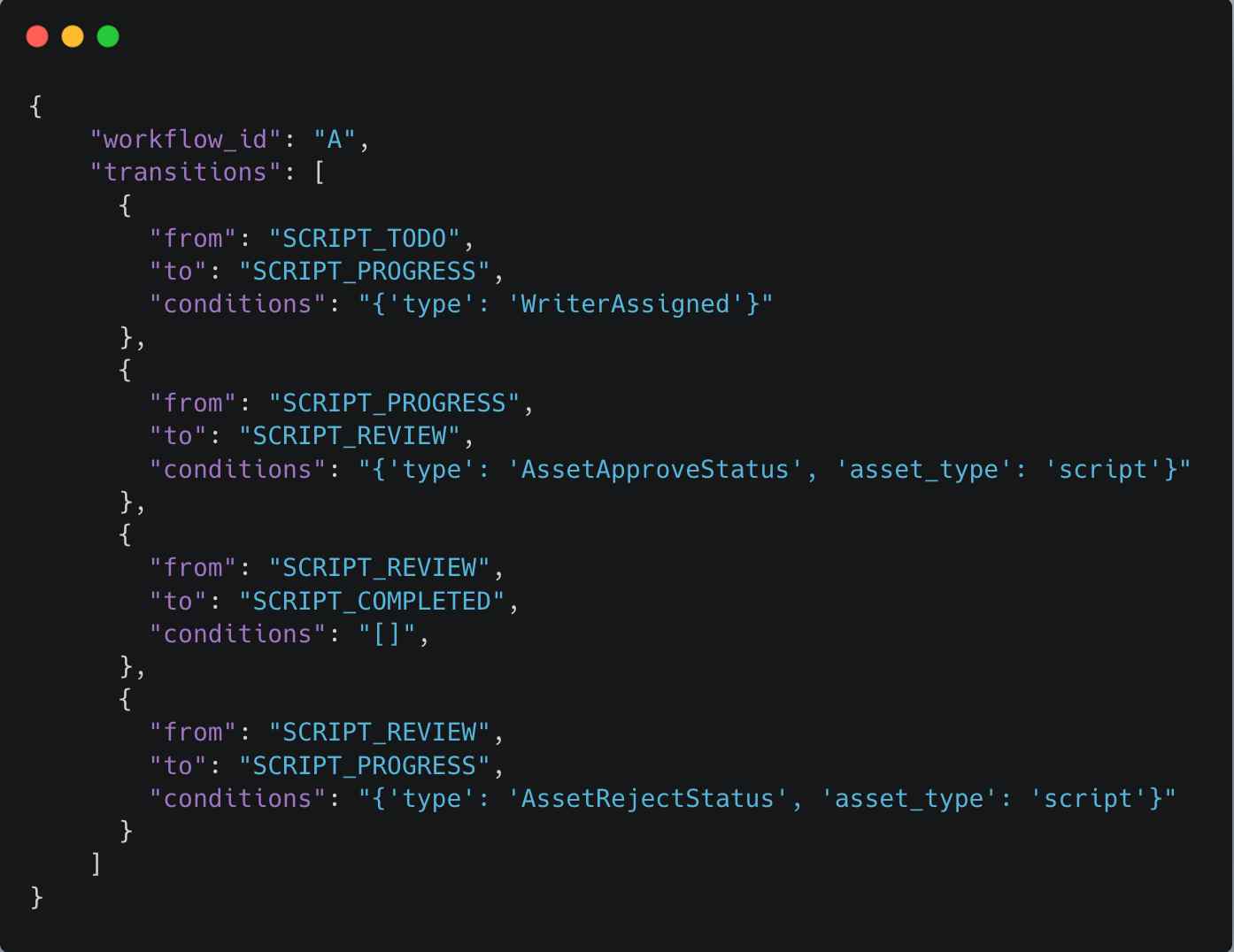
The above JSON snippet defines the state transitions within the workflow “A”. Each entry in the transitions array specifies how a state transitions to another state based on specific conditions.
For example, when a writer is assigned, the state progresses from SCRIPT_TODO to SCRIPT_PROGRESS. Similarly, approval or rejection events drive the workflow forward or backwards—ensuring a dynamic and rule-driven flow.
3️⃣ Authorization Rules
Authorization Rules control who can perform actions or approve transitions at each state — ensuring the right people are involved at every step, and the wrong people simply can't interfere.
These rules are defined as part of the workflow configuration itself, meaning access control is built into the workflow — not bolted on externally. For example, only a Pod Lead can approve a script moving to Audio, and only a Sound Lead can sign off on the Audio Master stage. A writer assigned to the script has no visibility into approval actions at all.
How it works in practice:
Each state defines which roles can perform which actions
The backend evaluates the current user's role against the state's authorization rules
The API response includes only the actions that user is permitted to take
The UI renders accordingly — unauthorized users don't just see disabled buttons, they see nothing at all
This isn't just a UI convenience — it's a security guarantee. Since the backend controls what actions are returned, there's no way to manipulate the frontend to perform unauthorized transitions.
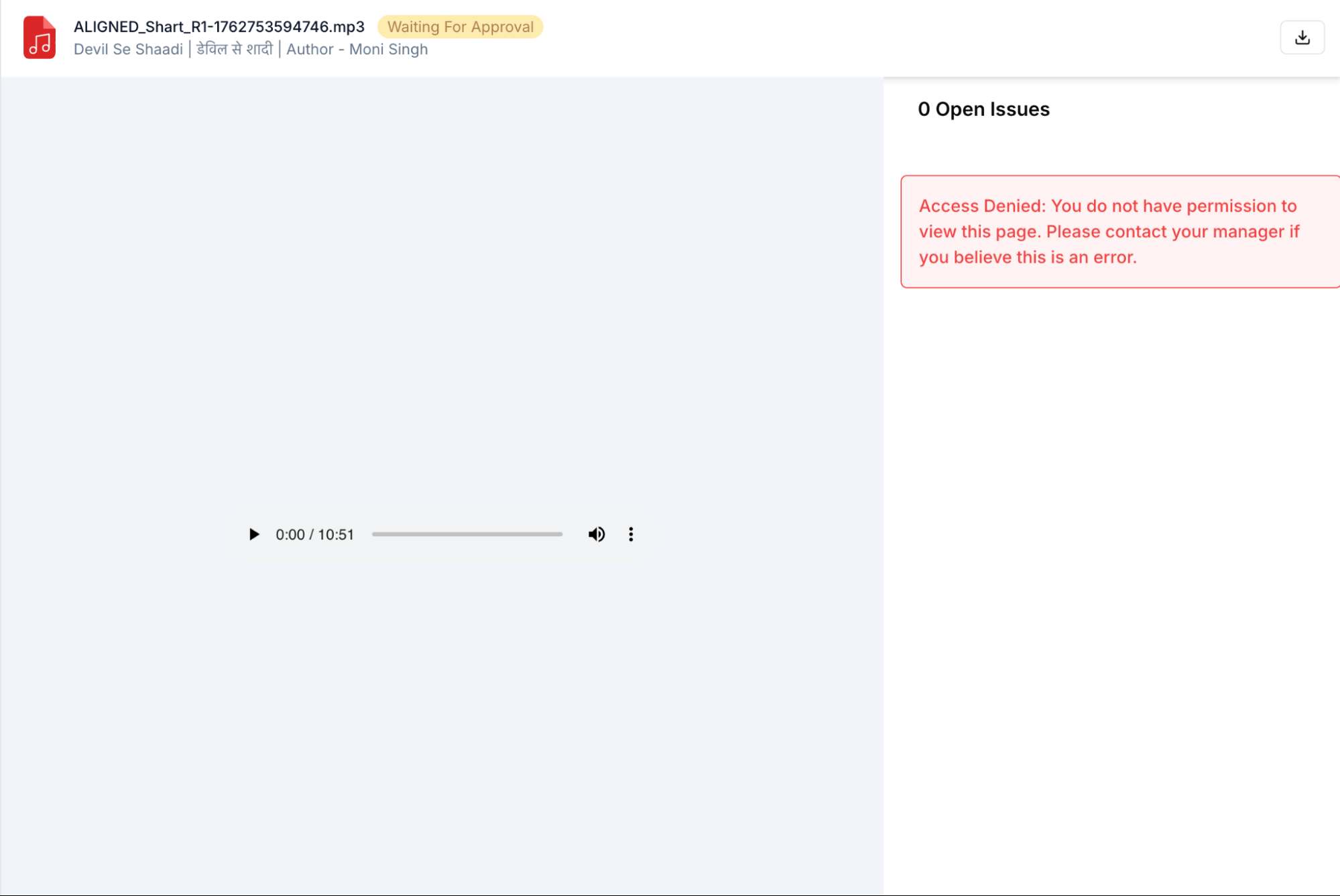
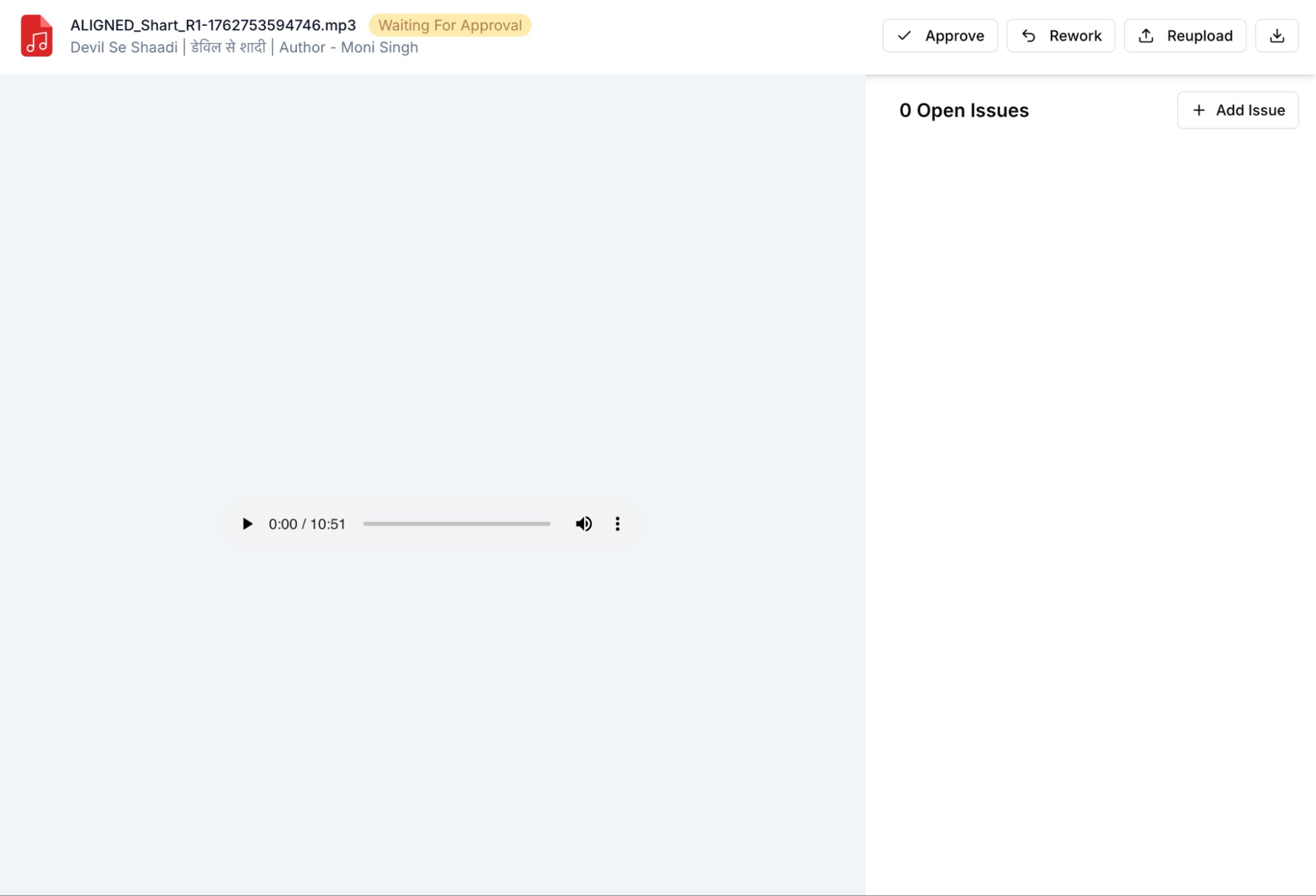
As shown below, a user without review access sees no approval or feedback actions, while an authorized member, like a Pod Lead or Sound Lead, has full review capabilities.
4️⃣ Assets
Represent the actual creative deliverables — such as scripts, audio files, or videos — that flow through different stages. Each asset retains context, version history, and metadata as it progresses through the workflow.
By mirroring the real-world creative pipeline, FLOW translates a manual, multi-step process into an automated, transparent, and trackable system — ensuring every task, file, and approval stays in sync.
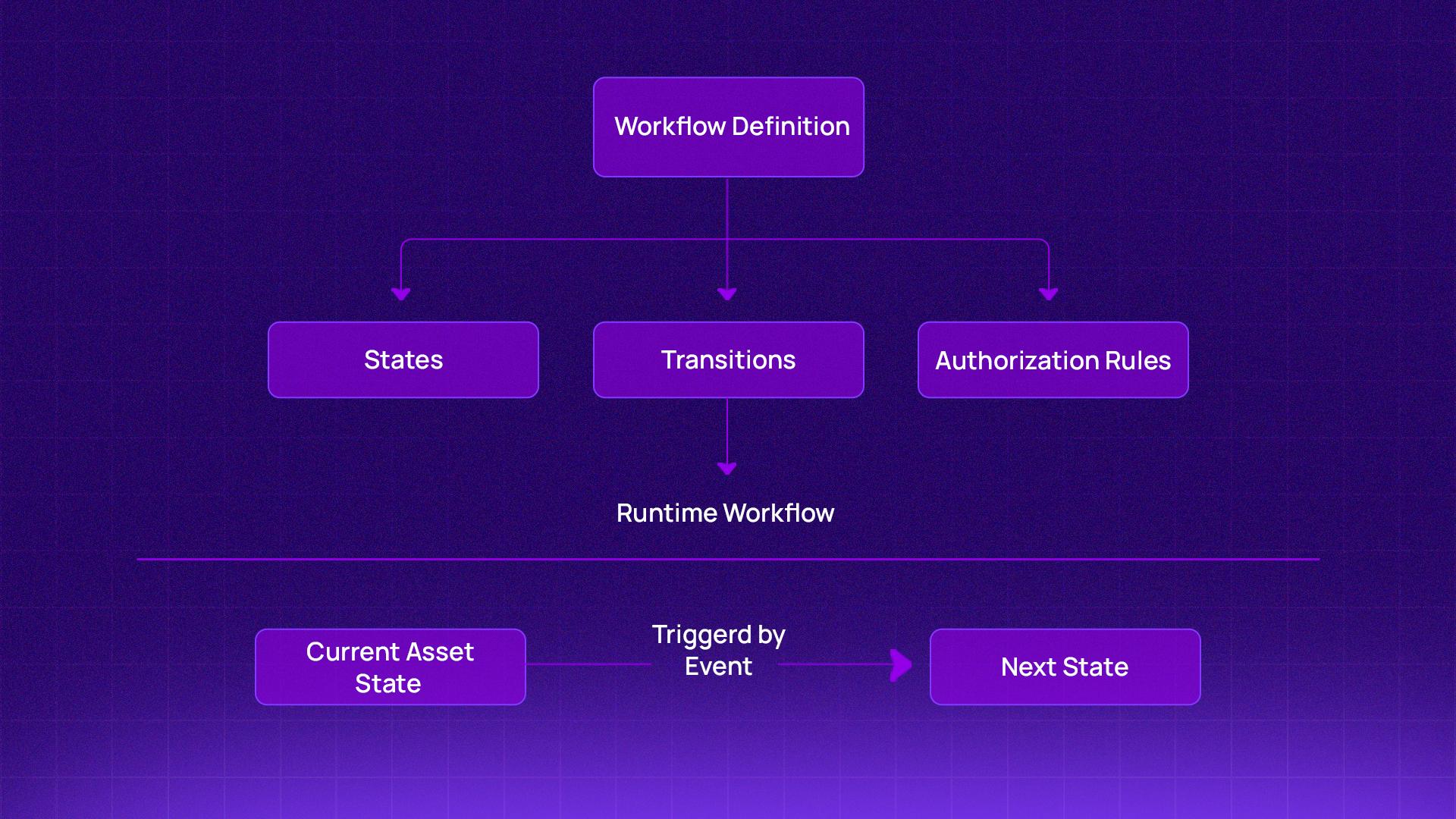
This structure allows FLOW to support multiple teams and content types simultaneously, while keeping control, visibility, and flexibility intact.
So far we've covered the conceptual model. Now let's go under the hood and look at how FLOW is actually engineered.
FLOW is engineered to support high-throughput, concurrent content workflows while remaining flexible enough to handle evolving business rules and content types. Its architecture is designed around performance, scalability, and backend-driven configurability.
🚀 Why Go?
FLOW is built in Go, chosen for its strong concurrency model, predictable performance, and low-latency execution. Goroutines and channels allow FLOW to process multiple workflows, approvals, and notifications in parallel — making it well-suited for large-scale content operations.
🧱 Shared Foundation with go-common
To maintain consistency across Pocket FM’s microservices ecosystem, FLOW leverages go-common, an internal shared library that provides:
Configuration management
Database abstractions (MySQL, Redis)
Kafka integrations
Structured logging
Input validation utilities
This shared foundation reduces boilerplate, enforces standardized patterns, and accelerates development across all Go-based services.
🗄️ Workflow Storage & Infrastructure
Workflow definitions, states, transitions, and authorization rules are persisted in MySQL, ensuring durability and consistency. Redis is used for caching and high-speed lookups.
Together, this setup ensures FLOW remains performant while managing multiple active workflows simultaneously.
🔁 State-Driven Workflow Execution
Each promo workflow is modeled as a state machine
Transitions between states are automatically governed by defined rules, approvals, and role-based permissions — eliminating manual handoffs and ambiguity.
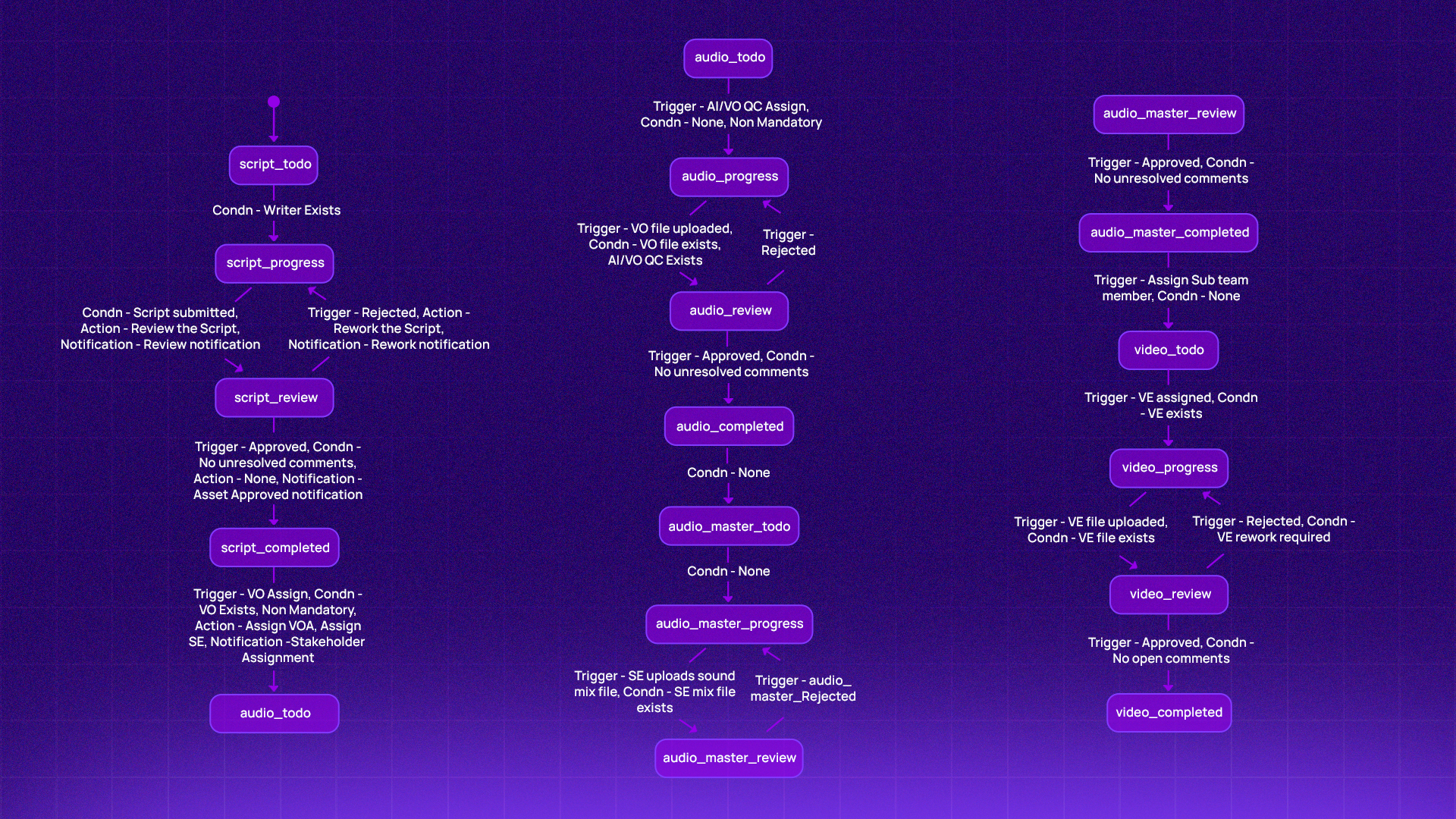
Here’s one example of a Promo Workflow that exists within FLOW — demonstrating how the system technically models and automates each stage of promo creation.
In this workflow:
SCRIPT_TODO represents the initial starting state, where the promo creation process begins.
VIDEO_COMPLETED represents the final end state, marking the completion of the promo after all stages are approved.
Between these two points, each intermediate state — AUDIO, AUDIO_MASTER, and VIDEO — represents a distinct phase of production. Flow manages transitions between these states automatically, based on approvals and defined rules.
🖥️ Backend-Driven UI (BFF Pattern)
FLOW follows a Backend-for-Frontend (BFF) architecture — meaning the backend doesn't just serve data, it tells the frontend what to show and who can do what, at every state of the workflow.
This was a deliberate choice. Without BFF, every workflow rule — which buttons to show, which roles can approve, what actions are available — would need to be hardcoded in the frontend. With 4+ workflow types and dozens of unique states, that approach would have made the UI brittle, inconsistent, and a nightmare to maintain.
Instead, every API response from FLOW includes a dynamic action payload — a structured set of instructions that tells the UI exactly what to render for that user, in that state, in that workflow. A writer sees a "Submit for Review" button. A Pod Lead sees "Approve" and "Reject." A viewer sees nothing at all.
This means:
No frontend logic changes when a new workflow is added or modified
Role-based UI is enforced at the API level, not just visually
Faster iterations — new states and actions go live without a frontend deployment
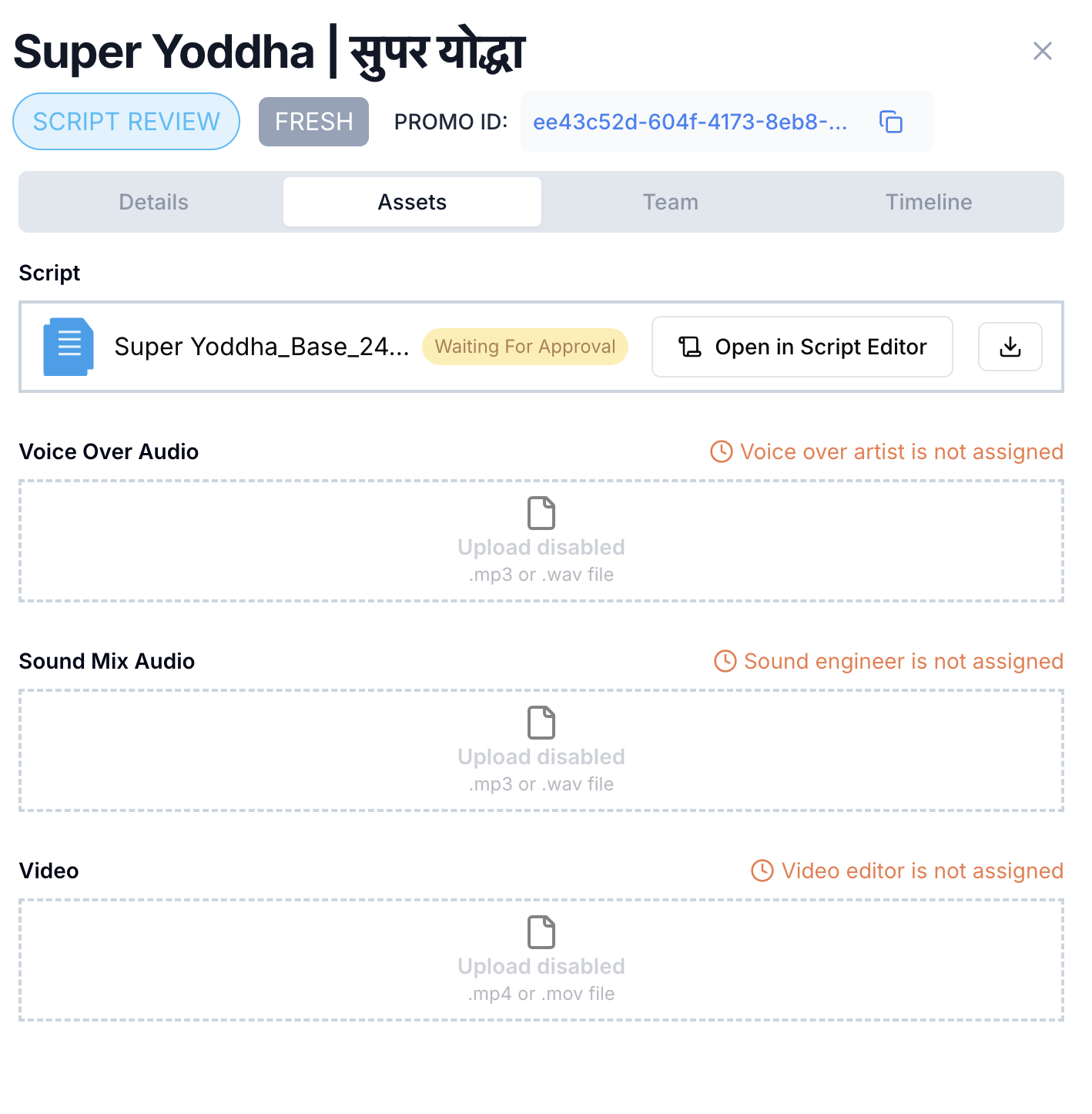
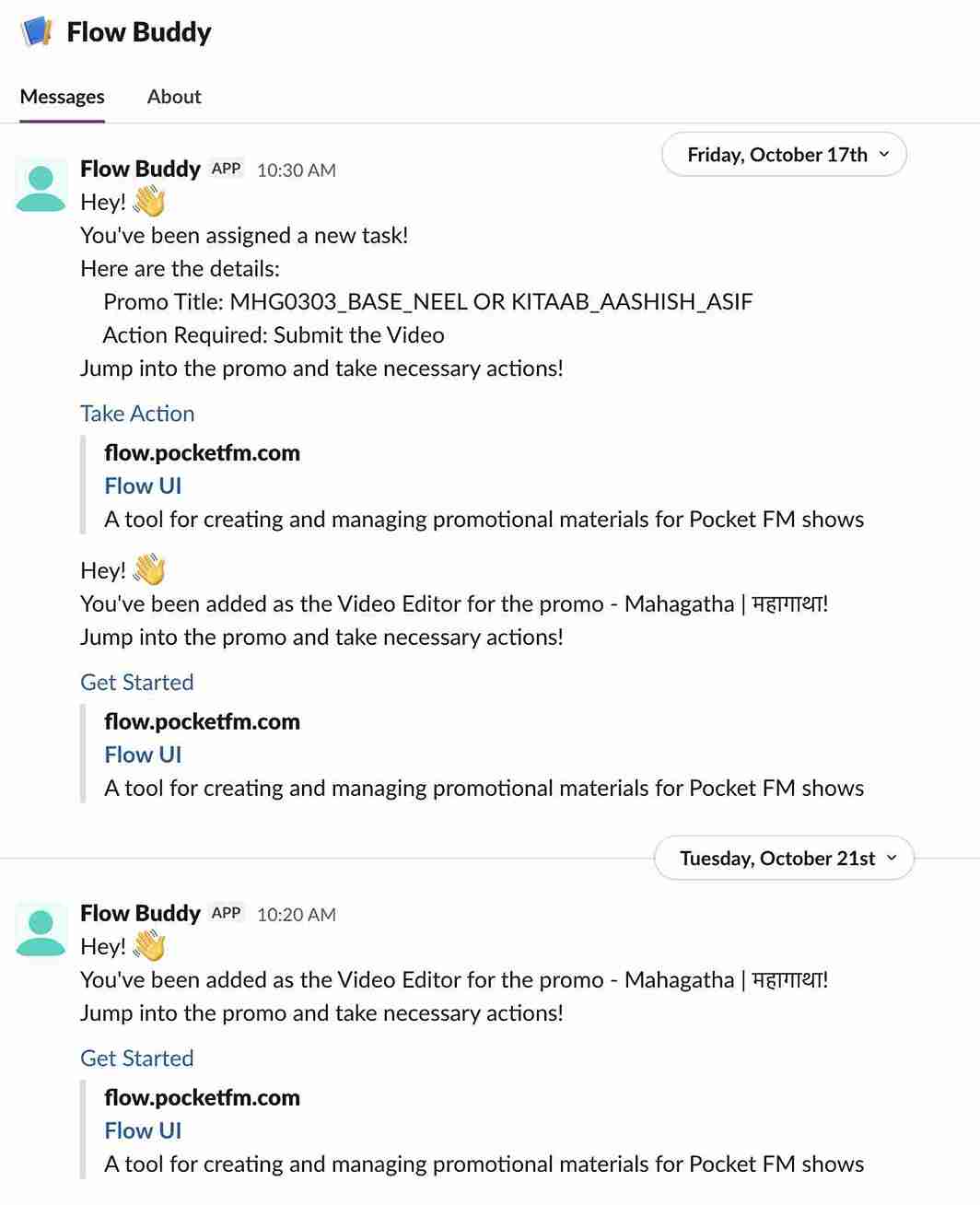
FLOW sends automated Slack notifications to relevant stakeholders at each transition, ensuring transparency and real-time updates across the workflow.
The Notification Module in FLOW powers real-time communication through a design that emphasizes decoupling, asynchronous processing, and extensibility. It’s built on three pillars: the Strategy Pattern, an Asynchronous Worker Pool, and Pluggable Notification Channels.
1. NotificationStrategy Interface – Pluggable Channels
The system is built around a simple 2-method interface that makes adding new channels trivial:
type NotificationStrategy interface {SendNotification(message string, context map[string]interface{}) error
Name() string}Extensibility: Currently supports Slack, but adding Email, SMS, Push, or Webhooks requires minimal effort.
Implementation:
SendNotification()—defines channel-specific logic.
Name()—identifies the strategy.
Integration: No core changes needed—simply register your new strategy.
2. Persistent Worker Pool – Concurrent Processing with Goroutines
At startup, the service spawns a pool of goroutines that run indefinitely as background workers.
// Start worker pool (Persistent workers)for i := 0; i < cfg.Notification.WorkerPoolSize; i++ { service.wg.Add(1) go service.worker(i)}Each worker listens on a buffered job queue and processes notifications concurrently.
3. Non-Blocking Sends – Queue-Based Async Pattern
When a notification is triggered, it’s immediately enqueued, and control returns to the caller.
// Send enqueues notifications to the job queuefunc (n *NotificationService) Send(data NotificationData) { n.jobQueue <- data}The buffered channel means the main application never waits for external API calls (like Slack). Go routines pick up jobs from the queue and handle all I/O operations asynchronously.
🚀 Strong Adoption & Measurable Impact
Since its launch, FLOW has become a core part of content operations at Pocket FM — spanning 4+ workflow types, 10+ specialized pipelines, and multiple regions. Adoption has grown organically — teams that onboarded FLOW didn't need to be convinced. The reduction in back-and-forth, the visibility into progress, and the elimination of manual follow-ups spoke for themselves.
The numbers reflect it:
Automated voice generation cut promo TAT by ~12 hours
Ad creation time reduced by ~90% — from 45 minutes to under 5 minutes per asset
The volume of content flowing through the platform grows week over week — and FLOW's architecture is built to scale with it.
🔍 100% Transparency & Control
Every piece of content has a journey - from the moment a script is assigned to the final approval before publishing. FLOW makes that entire journey visible.
At any point, producers and leads can see exactly where a piece of content is in its lifecycle - what state it's in, who's responsible for the next action, and what approvals have already happened. Every transition, approval, and rejection is recorded with full context - nothing is ambiguous, nothing is assumed.
The journey of every content piece is no longer something you have to piece together - it's right there, in real time.
⚡ 35% Faster End-to-End Production
Before FLOW, moving content from one stage to the next meant manual follow-ups, status checks, and waiting for the right person to respond. Approvals got delayed. Work sat idle.
By automating state transitions and enforcing role-based approvals, FLOW eliminated these delays entirely. The right person gets notified the moment action is needed — and the workflow moves forward automatically once they act. The result: end-to-end production time cut by 35%, with no additional headcount.
🔒 Secure, Auditable, and Compliant by Design
Every transition, approval, and rejection is recorded with context — giving us a complete audit trail for compliance and quality assurance. Accountability is now built directly into the system, not enforced externally.
FLOW is actively evolving. Here's a glimpse of what's coming next.
🤖 Workflow-level Automation with AI Assistants
FLOW has already taken its first step toward full AI automation — with one content story workflow now running end-to-end autonomously. Once a writer submits the script, the entire production pipeline — voice generation, audio processing, and final output — executes without any human intervention.
Building on this, the vision is to bring this level of automation to every content type — reducing manual effort, improving consistency, and letting creators focus on what matters most: the story itself.
📊 Enhanced Observability and Insights
Every workflow that runs through FLOW generates data — and over time, that data becomes institutional knowledge. The next step is surfacing this intelligence directly to creators.
A writer working on a new script could draw from the history of what has worked before — what content patterns resonated, what approaches consistently sailed through reviews, and what the audience responded to across different formats. Instead of starting from a blank page, creators start with the collective wisdom of everything Pocket FM has produced.
The goal is to make every piece of content smarter than the last — not by changing how people create, but by giving them better information when it matters most.
⚡ Parallel Transitions for Simultaneous Work
Today, most workflows move sequentially - one stage completes before the next begins. But in reality, many tasks don't depend on each other. A thumbnail can be designed while audio is being edited. A translation can begin while the master audio is being reviewed.
Parallel transitions will allow multiple stages to progress simultaneously — unlocking a new level of efficiency without changing how teams work.